Warehouse Management
Pick, pack, ship.
COGS updates automatically.
dbrand went from 2,000 to 7,000 orders per shift with Fulfil. Every warehouse movement updates your inventory costs and financials. No disconnected WMS.
Customer stories
Brands shipping millions of orders.




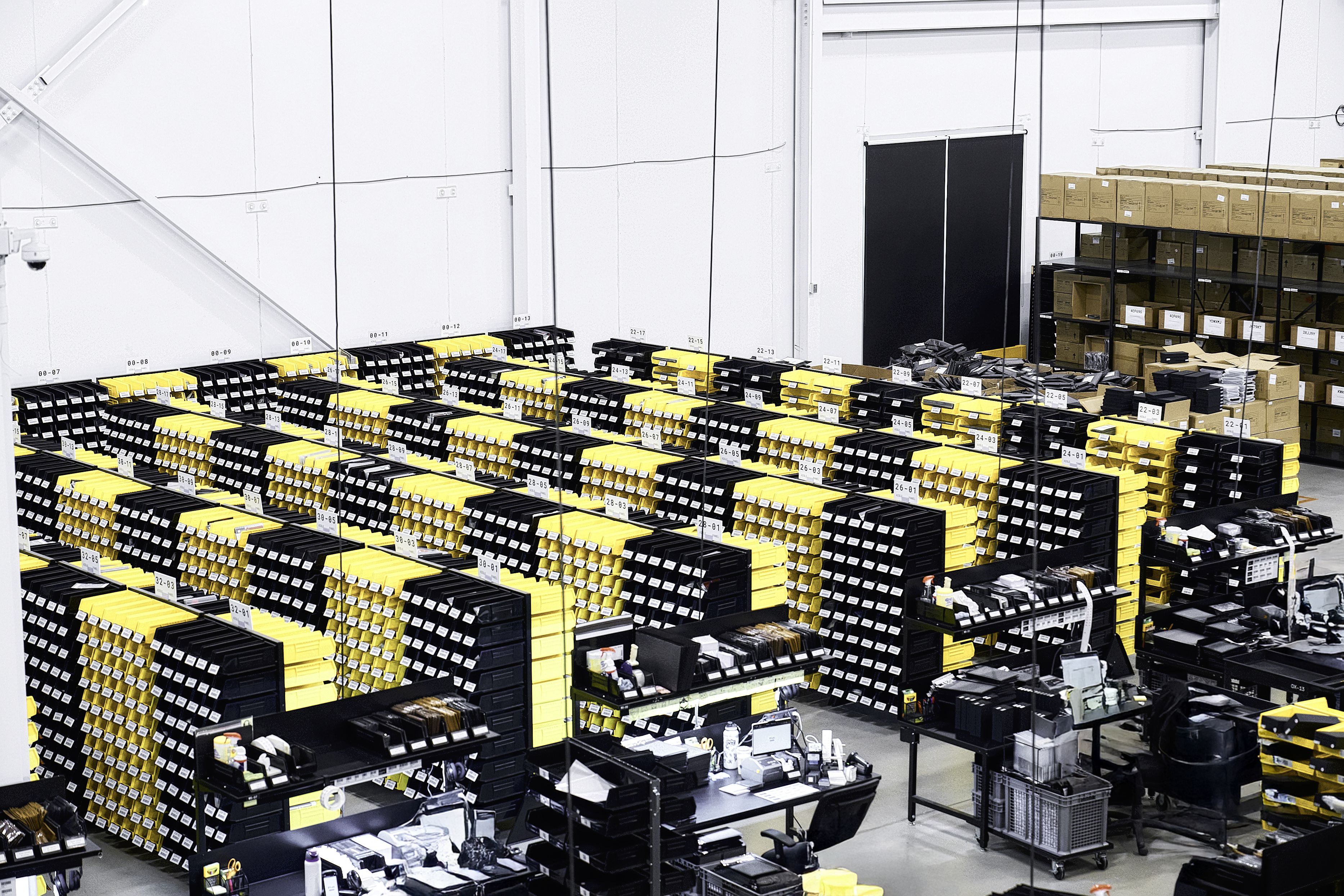

Every warehouse action
updates your financials.
Pick an order. Inventory allocated. Pack a shipment. Inventory reduced. Ship an order. Revenue recognized, COGS posted. Receive a return. Inventory restored, revenue reversed. All automatic, all in your ERP. No manual journal entries.
Why Warehouse Management in Fulfil vs. Disconnected Systems
ShipStation works for basic shipping but has no warehouse management or financial integration. You're manually updating QuickBooks with inventory values and COGS. Adding more tools creates disconnected systems requiring constant manual reconciliation. Fulfil connects warehouse management to your complete ERP. Every pick, pack, and ship updates inventory costs and financials automatically.
| Feature | ShipStation + QuickBooks | Fulfil ERP |
|---|---|---|
| Scope | Shipping labels and order management | ✓ Complete ERP: warehouse + inventory + financials |
| Inventory valuation | Inventory cost tracked separately from warehouse activity | ✓ Every warehouse movement updates inventory value and COGS |
| Financial integration | Export to QuickBooks, manual reconciliation | ✓ Native accounting: picks = inventory allocation, shipments = revenue recognition and COGS posting |
| Multi-channel | Multi-channel shipping | ✓ Unified inventory across warehouses and all sales channels |
| COGS tracking | No COGS tracking | ✓ Shipments and returns post to the GL automatically |
| System complexity | Multiple disconnected tools in your Frankenstack | ✓ All in your ERP. One system. |
Built for flash sales,
product drops, and high-velocity orders.
Unlike traditional WMS built for B2B wholesale (pallets and case packs), Fulfil handles modern DTC warehouse challenges:
- Process thousands of orders during flash sales and BFCM spikes
- Receive and ship product drops the same day
- Batch pick hundreds of single-SKU orders for fast fulfillment
- Kit bundles on-the-fly with accurate COGS tracking
- Manage same inventory pool across DTC, Amazon FBM, and wholesale
Flash Sales
Process thousands of orders in hours, not days
Product Drops
Receive inventory and start shipping same day
Batch Picking
Pick hundreds of single-item orders efficiently
Kitting
Assemble bundles with accurate COGS tracking
Why this matters: Traditional WMS tools were built for warehouses shipping pallets to retailers. Fulfil was built for brands shipping individual units to consumers across multiple channels. Financial tracking is built in.
Mobile operations
with the GL posting as orders ship.
Pick and pack on a handheld scanner in the browser. When the shipment is marked done, inventory comes off the books and the shipment posts its journal entry, with COGS following when the invoice posts. No export to an accounting tool.
- Inventory allocated as you pick orders
- Mark any SKU Scan Required and Fulfil blocks pick or pack completion until that barcode is scanned, no manual override, no relying on pickers to self-police quantities
- Journal entries posted automatically when shipments are done
- Revenue recognition triggered on ship confirmation
- Finance sees margins and profitability as orders ship
Barcode Scanning
Scan items during pick, pack, and ship
Batch Picking
Pick multiple orders in one trip
Packing Validation
Verify items before shipping
Automatic Sync
Shipments and receipts post to the GL automatically
Why this matters: Traditional WMS apps just track "what got picked and packed." Fulfil updates inventory values, COGS, and revenue recognition. Finance can see margins and profitability as orders ship. Not days later after manual reconciliation.
Seasonal staff
Temps picking on day one.
“Fulfil's intuitive platform made it possible to rapidly onboard 120 staff during peak season with just a tablet and login.”
“We can hire temps that we don't have to explain much to. Before there was just like, there's no way, we'd have to hire somebody a year in advance just to get them to be able to pick a little.”
“During our busy season, we recruit employees from different departments to help out, and it's as easy as press this button and it'll tell you what to do after that.”
DTC from Shopify
Pick from your warehouse
Amazon FBM
Ship Amazon orders from your warehouse with automatic inventory sync
Wholesale Orders
Different pricing, Net 30 terms, proper wholesale accounting
Retail Stores
BOPIS and BORIS with proper revenue recognition timing
One inventory pool,
multiple sales channels.
Most brands manage multi-channel inventory with disconnected tools. Shopify for DTC, Seller Central for Amazon, a separate system for wholesale, then manually sync everything to QuickBooks. Fulfil manages all channels from one inventory pool.
- DTC orders from Shopify → Pick from your warehouse
- Amazon FBM orders → Ship from your warehouse with automatic inventory sync
- Wholesale orders → Different pricing and proper wholesale accounting
- Retail stores → BOPIS and BORIS with proper revenue recognition
One source of truth: Your inventory value, COGS, and financials are accurate across all channels. No disconnected systems, no manual reconciliation.
Ready to see warehouse operationsconnected to financials?
Ridge reduced order processing time from 5 to 2 days. Kotn eliminated 7-10 hours of manual work per team member weekly.
See How It WorksTrack true costs,
not just quantities.
Most WMS tools track "we shipped 100 units of SKU A." Fulfil also knows what those units cost: weighted average cost with freight and duty capitalized in, so COGS for that shipment posts from the same record that moved the stock.
- Pick multiple orders in one batch, with each order's shipment posting on its own
- Zone picking, with optional cost by warehouse
- Landed costs capitalized into weighted average cost
- True profitability visible by fulfillment location
Batch Picking
Pick 50+ orders at once with individual COGS per order
Zone Picking
Location-based costing for accurate margins
Landed Cost Tracking
Freight, duties, fees distributed per unit
Margins on Every Order
See true profitability per order immediately
Receiving
Scan products and auto-update inventory values
Landed Costs
Freight, duties, fees distributed per unit
Balance Sheet Updates
Inventory value updates automatically
Cross-docking
Receive and ship same day with full accounting
Receive goods.
Financials update immediately.
In disconnected systems, you receive inventory in your WMS, then manually update QuickBooks with inventory values later. With Fulfil, receiving goods updates your financials immediately. Your balance sheet shows accurate inventory value, and future sales will have accurate COGS.
- Scan products and auto-update inventory quantities and values
- Landed costs (freight, duties, fees) distributed across units
- Product cost updates to reflect new landed cost
- Cross-docking: receive and ship same day with full accounting
- Identify cartons at the receiving station by SSCC, package number, or carrier tracking number
- When a supplier ships more than ordered and the PO line is already fully received, receive the extra units against the closed purchase order. Fulfil adds them as a new line with the original price, taxes, and supplier
- Putaway suggests the product's preferred bins
Cycle counting
with automatic reconciliation.
The inventory accounting problem: You count 95 units in Bin A-5, but your system shows 100 units. The 5-unit discrepancy isn't just a quantity issue. It's a financial issue. Those 5 missing units represent inventory value that needs to be written off.
- Two-step verification confirms count accuracy
- Automatic inventory quantity and value adjustment
- Shrinkage automatically posted to GL
- Shrinkage visibility for finance as counts post
Scheduled Counts
By location or ABC classification
Two-step Verification
Confirm discrepancies before adjustment
Auto GL Posting
Automatic financial adjustments
Audit Trail
Complete history of all adjustments
See your warehouse run on Fulfil.
A 40-minute walkthrough built around your channels and volumes. No follow-up calls unless you ask.
Bin-Level Organization
Track exact location and cost per bin
Lot Tracking
Full traceability for recalls and compliance
Serial Numbers
Unit-level tracking for high-value items
Recall Management
Instant identification of affected inventory
Bin-level tracking
with location-specific costing.
When you pick from a specific bin, Fulfil knows the exact landed cost for those units. Pick from Bin A-5 ($12.50/unit) vs Bin B-2 ($12.20/unit). Finance sees accurate COGS per order based on which bin was picked, not an average cost across all units.
- Exact landed cost per bin location
- Lot and batch tracking for compliance
- FDA recall management with financial impact tracking
- Complete audit trail for all movements
Rate shop carriers.
Track true fulfillment costs.
Most WMS tools show carrier rates. Fulfil shows carrier rates AND tracks shipping costs to your financials. Finance sees true profitability by order, by channel, by shipping method.
- Rate shop across all carriers on every shipment
- Shipping expense automatically posted to GL
- Customer shipping revenue tracked separately
- Net shipping margin visible per order
- Automatically match each order to the smallest box that fits, before the packer even opens a box
- After buying a label, the packing station shows the carrier and service, label cost, tracking number, and carrier status. Void the label from the same screen with the Label voiding permission
Rate Shopping
Compare all carriers to find best rates
Label Printing
Generate labels directly from Fulfil
Cost Tracking
Every shipment posts expense to GL
Margin Analysis
True profitability by shipping method
Cartonization
Automatically match each order to the smallest box that fits, before the packer even opens a box
Returns Processing
Capture reason, condition, and route appropriately
Revenue Reversal
Automatic GL posting for refunds
Restocking
Restore inventory value or write down damaged
Return Analytics
Track return rates and financial impact by SKU
Returns processing
with full financial reconciliation.
Returns aren't just inventory movements. They're financial transactions. Fulfil handles revenue reversal, COGS reversal, inventory value restoration or write-down, and refund liability. All posted to GL automatically.
- Capture return reason and condition automatically
- Revenue and COGS reversal posted to GL
- Inventory value restored (sellable) or written down (damaged)
- Return rate and cost analytics by SKU
Warehouse analytics
connected to financial performance.
See operational efficiency AND financial impact:
- Pick rates by staff: Who's fastest? Who's most accurate? What's the labor cost per order?
- Warehouse efficiency by location: Which warehouse has lower fulfillment costs? Should you shift volume?
- Inventory turnover by warehouse: Which location has slow-moving inventory tying up cash?
Example insight: East Coast warehouse ships 60% of orders but has 20% higher per-order fulfillment costs than West Coast warehouse (longer pick times, older layout). Calculate that shifting 20% of volume to West Coast would save $80K/year in fulfillment costs, even with slightly higher shipping expenses for some orders.
Staff Performance
Track pick rates, accuracy, and labor costs per order
Fulfillment Costs
Labor + shipping + packaging vs. customer payment
Shipping Profitability
Are expedited shipments profitable after shipping costs?
Return Analytics
Financial impact of returns by product and reason
Running your own warehouse and a 3PL?
We'll show you both on one inventory and one set of books in a 40-minute demo. No follow-up calls unless you ask.
How brands use Fulfil WMS
Multi-Warehouse DTC
East Coast vs West Coast fulfillment
Same SKU, different landed costs by location. Orders route to nearest warehouse automatically.
Result: 3% higher margins on East Coast orders. Shifted receiving volume to optimize.
Peak Season
500 to 25,000 orders/day during BFCM
Batch picking groups orders by SKU. Pick time dropped from 5 minutes to 1 minute per order.
Result: Per-order cost dropped from $4.50 to $2.80. Saved $12K in temp labor.
Returns Optimization
15% return rate on apparel
Return reason tracking revealed one dress had 25% returns, mostly "size too small."
Result: Updated sizing chart. Return rate dropped to 12%. Saved $18K/quarter.
Hybrid Fulfillment
Own warehouse + 3PL
California warehouse for West Coast, 3PL in New Jersey for East Coast. Orders route by region.
Result: 3PL costs $5.50/order vs $3.80 in-house, but saves $4+ in shipping to East Coast.
What's included
Everything you need for warehouse management.
Mobile receiving with landed cost.
Directed putaway, cross-docking, and inventory value updated as goods are received.
Batch, zone, and wave picking.
Pack validation and COGS tracking per order.
Multi-carrier rate shopping.
Automated labels, shipping cost to the GL, revenue recognition on shipment.
Bin-level tracking with lots and serials.
Cycle counting reconciles automatically to your books. RFID supported.
Quality inspection and disposition.
Reason codes, automatic financial reconciliation, restock and quarantine workflows.
Unlimited warehouses and 3PLs.
Routed by location, location-specific costing, profitability by warehouse.
Agentic ERP
A warehouse that answers to your agents.
Because Fulfil is an agentic ERP, your WMS isn't a locked black box. Need to know why one shift is out-picking another? Vibe-code a custom picker-performance dashboard as a Micro App in minutes, no BI license, no developers. Ask Claude over MCP to surface today's shipments by carrier, or let an AI agent via the CLI reprioritize waves before a cut-off. It's all part of Fulfil's AI platform.
FAQ
Questions? Answers.
Can I use Fulfil if I also work with 3PLs?
What happens when I migrate from my current WMS to Fulfil?
Does Fulfil support multi-warehouse operations?
How does Fulfil track COGS for warehouse operations?
Can warehouse staff use Fulfil on mobile devices?
Can I force pickers to scan every item?
How does Fulfil handle returns accounting?
What picking methods does Fulfil support?
How does cycle counting work with Fulfil's financials?
What is the best warehouse management system for a DTC brand?
Do I need an ERP or a standalone WMS?
Can Fulfil replace ShipStation?
Can Fulfil replace ShipHero?
Does Fulfil WMS work with a 3PL and my own warehouse at the same time?
What handheld scanners work with Fulfil WMS?
How does Fulfil keep pick locations stocked?
Can I cycle count without shutting down the warehouse?
Related capabilities
More tools that work with your warehouse.
Connect your warehouse
to your ERP.
See how Fulfil's warehouse management updates your financials on every movement.